App Design

We’ve created some simple slideshows to walk you through the apps design and functions. The fist slideshow gives you an idea of how to use the app, while the second shows you how to set up and manage tasks and rewards.

You can also test out our prototype for yourself, but keep in mind that some functionality is missing as this is only a prototype that shows the consept. Click anywhere on a page in the app and the clickable items should be marked in blue.

Setting up and using the app

Managing tasks and rewards

Gameplay

As our app is a gamification, it makes sense to look at it from a game-perspective from time to time. This raises a question: what types of actions do we make our users do? Using game language, what is the gameplay of our app?

As stated in earlier blog posts, our players will recieve tasks to complete. These tasks are given to them by other players. Therefore it is difficult to say anything specific about them. However, we know all the tasks will be something the players have to complete outside our app, that will hopefully have visible results in their environments. Examples include doing the dishes, cleaning the bedroom, mowing the lawn and doing homework. These types of tasks will form the core gameplay of our gamification.

Since the tasks are created by the players themselves, someone has to take responsibility of creating them. This will mean keeping track of what needs to be done, creating and distributing this into tasks in our app, and keeping up with wether they are completed. Our app will help with the last part, sending a notification whenever a task gets checked as completed by another player. The responsibility of keeping track of what needs to be done and creating tasks for this in our app should be split between the players old enough to handle it. We want to minimize the burden of this by making it easy to set up tasks that repeat either weekly or monthly. Setting up tasks can also be made into tasks in itself, so that the players that take this responsibility are rewarded for it. However the family decides to handle it, this management of tasks will form a secondary gameplay element in our app.

The final type of gameplay in our app will be formed from the reward system. As we hope this might work as a sort of mini-simulation of a market, someone will need to maintain it. This can mean creating new rewards and setting and adjusting prices. This is closely linked to the creation of tasks, as prices need to be set according to the player’s income. We hope that keeping prices balanced can be an interesting challenge to our older players.

To summarize, the core gameplay tasks of our gamification is to complete the tasks assigned to you in the app. Creating and assigning tasks, along with creating and adjusting rewards and their prices will form secondary gameplay elements for some of our players.

Game mechanics

Our app is a gamification made to help families structure their everyday lives. The word “gamification” implies that we have borrowed elements typical to games. What are these elements in our app?

Our entire app is set up almost like a quest system in an RPG, even if we don’t present it like that. You will be given tasks to complete, and earn currency when you do. In our app, this currency is simply called Points. These points can be exchanged in our app for different rewards in real life. As said in earlier blogposts, it is up to the family to create both tasks and rewards, and decide their worth. We hope the mechanics around this will give all the players a reason to engage with our app. Parents should be invested in keeping the prices as fair as possible, while children might want to look to exploit low prices if they show up. Our hope is that this will create an interesting back-and-forth between parents and children, raising engagement on both sides.

In addition to points and rewards, our app is customizable. This will be further elaborated on in blogposts about the app’s design, but a short summary will be included here. While setting up, players choose a color. The app will color itself after this, making the app feel personal. This color will also represent them to other players in the calendar and other places. Players can also set a profile picture that will appear in their profile page. A lot of game-players love customization in game, and we hope this will resonate with players of our app as well.

The dangers of Extrinsic motivation

The goal of this app is to create a structured lifestyle for families, teaching them that having a structured lifestyle is beneficial. Having a structured life creates a healthier psychological being (We’ve all heard clean house, clear mind).

One of the issues that may arise in our app is that it purely feeds on the extrinsic motivation of the family. This is an issue because extrinsic motivation can eliminate intrinsic motivation, and that undermines what we want to accomplish. Karl Kapp writes:

Extrinsic motivation is least likely to work and most likely to cause negative effects on intrinsic motivation when the external rewards are functionally superfluous (not needed to engage the learner) and not informative about the student’s level of ability or knowledge level regarding the task.

Karl Kapp, Page 96

We can use this information to make our app more suitable to our goal. Looking at the quote, we can see that these both are the opposite of what Self-Determination Theory builds on.

Self-Determination Theory has three main focus points that has been scientifically proven to build intrinsic motivation. We’re only looking at two, and they are:

  • The Feeling of control, and can determine the outcome of their actions
  • Competence, getting a feeling of mastery and a need for challenge

A lot of children do feel that chores are boring, and unnecessary, because in the end, the clutter goes “magically” away. To fight this, parents need to be diligent and give the child lots of positive reinforcements, show the importance of the task being done and the result of it.

We’ve implemented a message system, so when a completed task has been done, the person reviewing the task can leave a message. We want the users to use this to express their satisfaction/dis-satisfaction with the result of the task, and we remind the parents to do so, either orally or through a message. This builds on the feeling of competence, showing the user that they’re either doing a good job or is improving.

As said the goal for our app is to create structure for the family, especially the children. To accomplish this, the child needs intrinsic motivation. Using the power of extrinsic motivation correctly, and using Self-Determination theory, This app can create that.

Taking a closer look at statistics

In the profile page, we have a list of statistics the player can see about themselves. I’m going to go into some of the specific statistic, and explain why we’ve added them, and potentially some theory behind it.


Highest Streak / Current Streak

This shows how many days the user has completed all their tasks in a row. The function for this is to show the player progression, and urge them to work hard towards either getting their streak as long as possible, or to beat an already lost streak.

Task Completed the last 7 days
Our goal for this is for the player to see the percentage of tasks done within 7 days. We originally thought that it could be based on the week as a whole (Monday-Sunday), but we considered the fact that there could be a demotivating factor, and could result to a person not wanting to do any more tasks in the rest of the week if they’ve already missed a task. We decided to fix this by not making it week-based, but rather day-based. If the player wants to get a 100% completion rate, they have to do all tasks 7 days in a row. This gives the player motivation to get back to the 100% completion rate by being extra cautious on finishing their tasks.
The reason we decided to make it a percentage is the fact that there could be an aspect of rivalry between players, as there often is between siblings. children may want to be the best and shove it into the other players’ face. The problem with this is that some can’t do as many tasks or have enough responsibility as their older sibling. It would be unfair for them to see on how many tasks completed as anything else than a percentage. We don’t want any player to feel bad about the amount of tasks they have, relative to other players. In short, we want it to be fair for all players.

Total points achieved
Showing how much the player has earned by their hard work is also motivating, and is something that the user can and should be proud of. One thing that people who control the tasks should be aware of, is to try to give the players around the same points. As stated above, rivalry can happen, and could in the end remove motivation from the younger player.

Teaching Children Economy

While the main purpose of Family Manager is to help families create and follow routines, it can also be a great and interactive way to teach children about economy.

The app’s game environment operates as a local economic system within the family. Think of the points as a sort of currency. The family is given a lot of control over this system, since they determine the worth of labor and rewards themselves. This means the app can adapt to different families in different situations.

Earning points

In the app, points are earned by doing specific assignments. The child always knows what the assignment is and how many points it is worth. This mirrors our society where money is earned through labor.

According to consumer researcher Andrea Borch at the National Institute for Consumer Research (Norwegian: Statens institutt for forbruksforskning, SIFO) this approach is a good way to teach children the relationship between labor and money. Even if household-tasks later in life give no extrinsic rewards like a job would, in her experience the children will naturally understand the difference when they get older and also learn to value said household work as much as any other job (Noer, 2011, Stykkprisavtaler).

Willy-Tore Mørch, psychologist and professor of child and adolescent mental health at the University of Tromsø, agrees that children should be rewarded for completing assignments, but states that they should not get extrinsic rewards for good behavior. Parents should influence behavior through personal interactions and as role models. He also points out that both children and parents can learn a lot from negotiating and coming to an agreement on what sort of tasks should be done in the household (Nyquist, 2017). This is why we strongly encourage the family to set up task and rewards together, and make sure the parents also have their tasks set up in the app – not just the children.

Spending points

The child can spend the points they earn on rewards predetermined by the family. The specific reward and number of points it will cost mirror a real market, where people exchange money for goods and services. Unlike most economic systems, the points don’t circulate in the system like money would. They are created by parents and are removed from the system once a reward has been redeemed.

To connect the app to real life and make it easy for the child to transition to using money later in life, one could make the points resemble money, where for example 1 point = 1 NOK or 1USD. By doing this, children who are too young to freely spend money can still learn about its value. Spending 25 points to get an ice cream from the freezer at home will later feel familiar when spending 25kr to buy an ice cream in the store. This also makes it easy for parents to set up values for rewards. For example, if the child wants to save up for a new bike, a parent can set the item up as a reward where the price in points is equal to the real life price of the bike.

Once the child is old enough to start using money freely, our app supports rewards that automatically (through third party apps such as Vipps or Paypal) transfer money to the child’s bank account. This would take some of the control away from the parents, as the child can spend their money on anything, but according to Christine Warloe, consumer economist at Nordea, children need this freedom and the responsibility that comes with it, because they learn by doing and from their mistakes. If a child experiences having to stay home while all their friends are at the cinema because they spent their allowance, they might prioritize differently next time (Jørgensen, 2012, Gi dem ansvar).

Parents may still set up other rewards in the app if they so choose. This could be a good way to help the child with savings. For example giving them the choice of adding 100 points towards a bike in our app or spend those points to get 100kr added to their bank account. This way they can clearly see what their saving goal is and how close they are to it. This goal is also separated from their everyday bank account that they use for smaller sums such as lunch money or pokémon cards. This can be considered a stepping stone towards good saving habits as an adult.

It’s important to keep in mind that the rewards do not have to be related to spending real life money. Since the family decides what the rewards are they can include things such as TV or game time. However, we strongly discourage having family time as a reward. For example, going to the park as a family is a healthy habit and should not have to be earned.

This freedom means that families struggling economically can still teach their children about the relationship between labor and reward without having to spend money.

Conclusion

All in all the versatility of Family Manager makes it a good learning environment for children, where they can safely explore and help build an economic system with their family. The interactive experience and its resemblance to real life economy can help develop good saving and spending habits which can continue into adulthood.


Sources:

Jørgensen, K. K. (2012, February 9). Triksene som gir deg økonomiske barn. Retrieved March 25, 2019, from https://www.nrk.no/livsstil/laer-barna-okonomi-fra-de-er-sma-1.7986586

Noer, L. K. (2011, December 14). Lommepenger etter innsats? Retrieved March 25, 2019, from https://www.nrk.no/livsstil/lommepenger-etter-innsats_-1.7915890

Nyquist, J. (2017, May 23). Hvor mye skal barna få i lommepenger? Retrieved March 25, 2019, from https://www.santanderconsumer.no/magasinet/bedre-okonomi/barna-fa-lommepenger/

Scenarios for Future Simulation

To understand exactly how our users will interact with and be affected by our app, we will need to simulate some different scenarios based on what we consider our target audience. But who exactly is our target audience?

As we’ve stated in earlier blog posts, our app is targeted towards families with children. Of course the app may also be used by other groups such as students in a dorm, couples living together or individuals, but we will ignore those and focus our research on families. This will make our app easier to develop since we narrow down the target audience.

In our simulations we plan to use two very different examples of families as scenarios. To fit our target audience, both will be families with children, but with differences in the family’s size, ages and general household which may greatly affect how they end up using the Family Manager.

  • Family 1
    • Members
      • Two adults
        • Male (40)
        • Female (35)
      • Three children
        • Female (8)
        • Male (10)
        • Female (12)
    • Household
      • Big house, a lot of maintenance required
      • Have both dishwasher and dryer
  • Family 2
    • Members
      • One adult
        • Female (38)
      • One child
        • Male (16)
    • Household
      • Small apartment
      • No dishwasher or dryer

To make sure these were realistic users, we needed to know if children this age would have access to a cellphone. After some research into media usage by children, we found that 90-100% of children of both genders own a cellphone at the age of 10 and above, and at the age of 8-9 about 50-90% own one. This can be seen in the graph below from Medietilsynet (The Norwegian Media Authority), which shows parents reporting on whether or not their children own a cellphone.

Our next step will be to do some further research into the specific expected phone usage, activities and behavior of each individual in our scenarios, then we can start simulating!

A Look into Motivation

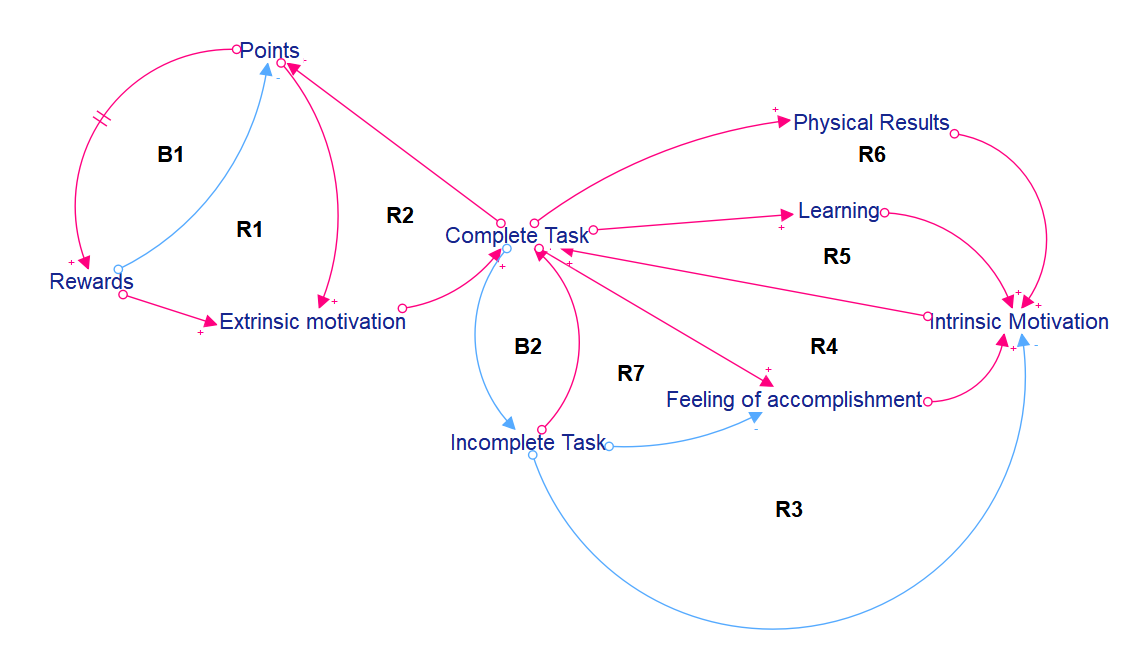
To make sure our app can give the user both intrinsic and extrinsic motivation, we took a closer look into motivation by creating a CLD.

This CLD shows how our application affects the users’ extrinsic and intrinsic motivation. As shown, there are a lot of loops affecting the intrinsic motivation.

Intrinsic motivation
When you complete a task, you get physical results, learning, and a feeling of accomplishment. All of these increase your intrinsic motivation, which results in more tasks done (R4,R5,R6). When you complete a task, the lesser incomplete tasks there are, and vice versa (B2). The less incomplete tasks, the more intrinsic motivation you get, as the work load gets smaller. This leads to more complete tasks (R6). The same happens with the feeling of accomplishment(R6).

Extrinsic Motivation
for each completed task, you get points. When you get points, you get extrinsic motivation for earning something (R2). after a while, you get enough points for a reward, which also gives extrinsic motivation (R1)
while also spending points (B1).

All in all, we can see that extrinsic and intrinsic motivation both fit in our idea. We think that parents would be driven more by intrinsic motivation, by seeing results and improvement of living conditions, while children and young adults may find the rewards and points a way to get motivated.
We’ll explore this theory in depth later.

Using our App

It is important for us to understand how our users will interact with our app, and how it will change their behaviour. To do this, we think of our app and our users as a system, so we can try to understand how it works.

Below is a CLD (Causal Loop Diagram) showing how we hope this system will look.

From glancing over this CLD one notices quickly that there is a lot more reinforcing loops (R1 – R4) than balancing ones (B1 & B2). This is a good sign, as it points to an increase in engagement over time. All of the loops visit motivation directly, which is also good, as boosting motivation is the most important thing for us when it comes to gaining engagement. We see that completing a task increases motivation (R2), as completing something is rewarding in itself. Completing a task also leads to fewer incomplete tasks, which also is motivating (R3). Completing a task gives the user points, boosting motivation even further (R1). Enough points can be exchanged for other rewards, which also works to mothivate the user (R4).

One element of danger in this CLD is the incomplete tasks. Having a lot of tasks hanging over the user will work to demotivate. It is important that these tasks do not pile up. This illustrates the importance of scaffolding, as discussed in an earlier blog post.

This CLD shows well how we hope using our app will give our users more motivation to complete their tasks, giving their lives structure over time.

Confidence, and Control

How can we give the users confidence and a sense of control in our app?

Using the ARCS model, we can see that the users should feel successful and that the app should create small successes along the way by completing small milestones. Our app does this through the point system, we want the user to feel accomplished whenever they complete a task. Earning points through hard work will hopefully motivate the user to do more tasks, meaning they will over time become better and do a more efficient job.

Giving the control to the users is an important factor in our app. Lepper’s control states:

  • Provide learners with a sense of control over the learning activity

This is one of the fundamentals our app is built on. The family has total control of the app, the tasks given to each individual person, the amount of points given for each task, and whether the task is accomplished or not.

Malone’s theory about challenge is also relevant here:

  • Challenges is flavored by the perception of the learner : If a user see a piece of software as a tool, he or she won’t want the use of the tool to be difficult. […]

We really want our app to be a tool, with uses of gamification to make the tool attractive. We want the app to be minimalistic and user friendly so that elderly family members and younger children could use the app simply and efficient.

In conclusion, this means that the responsibility of using the app as it’s intended falls on the users, but with the option for help ( See Scaffolding). By developing our app as a tool, making it user friendly and adaptable to each family, this app could create a foundation for confidence and control that helps the user maintain structure in their everyday lives.

Design a site like this with WordPress.com
Get started